Lock your PC.
Let the light rest.
PC lock and unlock can trigger your lights. Add conditions so a rule only runs when you want it to.
PC lockedLight off
 glowtray.
YOUR DESK, IN A DIFFERENT LIGHT
Turn down the brightness. Set the mood. Let your light follow your day. All from one little icon in your Windows tray.
Windows 10 / 11 · Hue Bluetooth · No Bridge needed
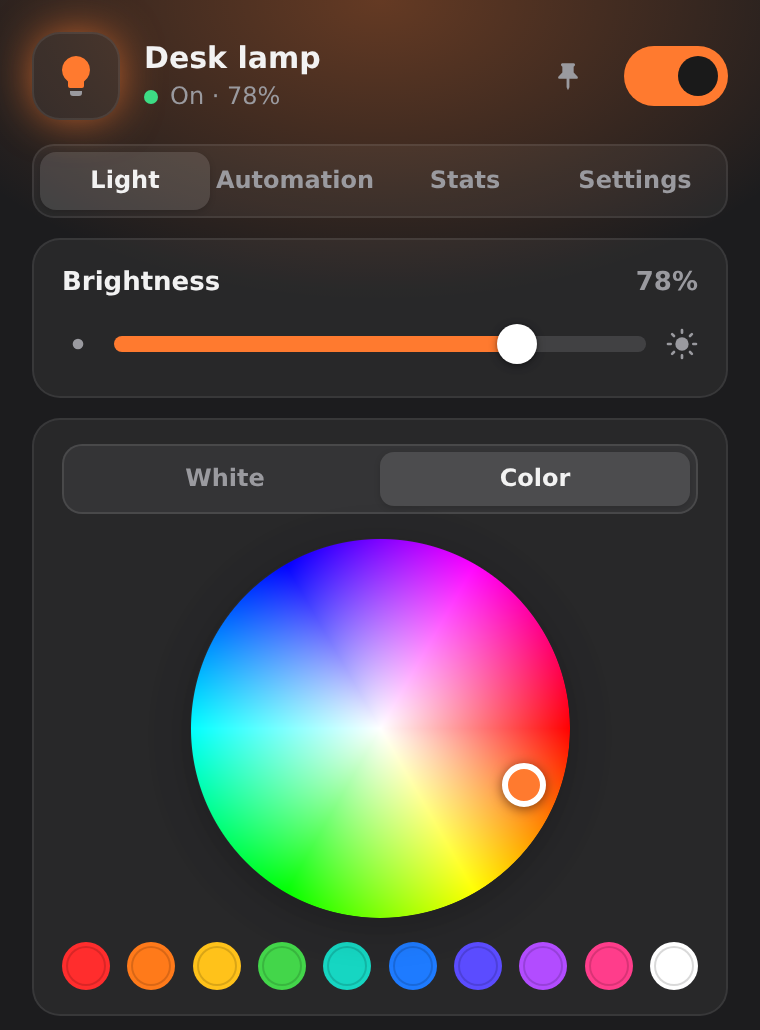 Actual interface · illustrative data
Less reaching for your phone.
More feeling at home at your desk.
01 — YOUR LIGHT, YOUR WAY
From focused mornings to one-more-song evenings. Brightness, white tone, color and saved scenes are only a click away.
A warm amber palette for the quiet part of your day.
Scene selected → warm, soft light.
Interactive product demo · simulated interface
02 — A LITTLE MORE AUTOMATIC
Build rules around the way you use your PC. A trigger, a condition, an action. Then get back to your day.
PC lock and unlock can trigger your lights. Add conditions so a rule only runs when you want it to.
Schedule scenes and gentle fades, or set a sleep timer. Everyday adjustments, without another thing to remember.
Match screen brings the dominant display color to a color-capable bulb. Ambient color matching, not frame-perfect video sync.
03 — TAKE A LOOK INSIDE
A compact panel, not a control room. Explore the actual interface below.
Power, brightness, white tone and color. Pick a preset scene or save your own.
Screens rendered from Glowtray's real panel UI with illustrative data. Not a live Windows or Bluetooth session.
04 — NO MYSTERY BOX
Made for a specific setup.
Honest about what it does.
Glowtray targets selected Philips Hue lights with direct Bluetooth control, one bulb at a time. White bulbs get power and brightness; White Ambiance adds white tone; color models add color features. Features depend on the model and firmware; not every combination has been tested.
Hue Bridge-only lights, other brands, Matter, Thread and Wi-Fi bulbs are not supported.
Windows 10 or 11, Bluetooth LE and Microsoft Edge WebView2 Runtime. Make your bulb discoverable, then search for it in Glowtray's Settings panel.
By default, Glowtray releases its Bluetooth connection when idle. A bulb accepts only one connection at a time, so close the phone app when connecting from your PC.
The chosen display is sampled locally while the effect runs. Images are processed in memory, not saved or uploaded; Bluetooth carries light-control commands, not screenshots. Stop the effect to stop sampling.
No. Energy and cost figures are estimates based on the wattage and price you enter, alongside usage time. They are not readings from an electricity meter.
A LITTLE UPGRADE TO YOUR EVERYDAY
Meet the little bulb in your system tray.
v1.2.0 · Opens GitHub Releases
Unsigned Windows executable. Review release details and requirements before running.
Download the app
Read the release notes.
Find your bulb
Settings → Device → Search.
Make it yours
Pick a color. Save a scene.